Cricket Betting App Download — Add the Easy App Icon and Log In
Searching for a cricket betting app download usually ends at a store page with nothing on it. The working route is shorter: open your exchange in Chrome or Safari, pin it to the home screen, and sign in with the ID the Online Cricket ID desk sends on WhatsApp. About a minute of setup, no store account, and the same login runs on Android, iPhone and laptop.
Where an exchange has its own Android APK, the Online Cricket ID desk sends the current file on WhatsApp. Never install one from a forwarded link. 18+.
Cricket Betting App Download Without a Store: The Easy Route
Most people who message Online Cricket ID about an app have already typed the exchange name into Google Play and found nothing.
Nothing is broken on your phone. Google Play in India does not carry real-money betting apps, so the Play search was never going to show Sky Exchange, FairPlay or any of the other 15 names on the Online Cricket ID rack, and the iPhone store behaves the same way for them. What you install instead is a shortcut: the exchange running inside Chrome or Safari, one tap from your home screen, and that is the whole cricket betting app download as far as these exchanges go.
The icon opens the live exchange site, so the odds, the session lines and the casino lobby are exactly what a laptop user sees.
Nothing to sign up for at a store, and no update prompts, because there is no installed package to update.
Your Online Cricket ID login (username plus password) works in the icon, in a normal browser tab and on a second device.
Back and lay, fancy markets, in-play and the card tables all sit inside the same web app.
So when the desk talks about downloading the app, it really means two minutes of tapping inside Chrome or Safari. Some exchanges do publish an Android APK as well; that case has its own section further down, and the short version is that the file comes from the Online Cricket ID WhatsApp thread or not at all.
One ID belongs to one exchange. If you pin two exchanges, you hold two IDs and two balances, and nothing moves between them.
Android Cricket Betting App Download in Chrome, Quick Steps
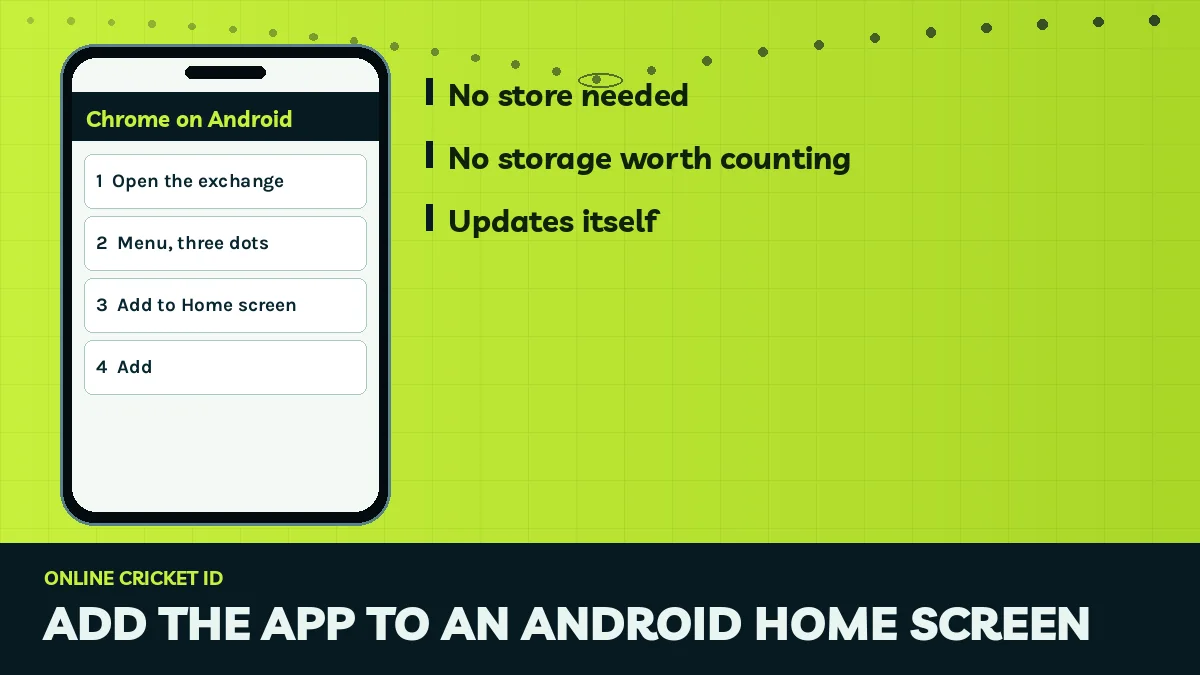
Chrome on Android is the smoothest path for an Online Cricket ID account. Under a minute.
Before you start, have the exchange address from the Online Cricket ID desk open in a chat, because the shortcut copies whatever page you are on when you tap Add, and pinning a search results page is the most common way people end up with an icon that goes nowhere useful.
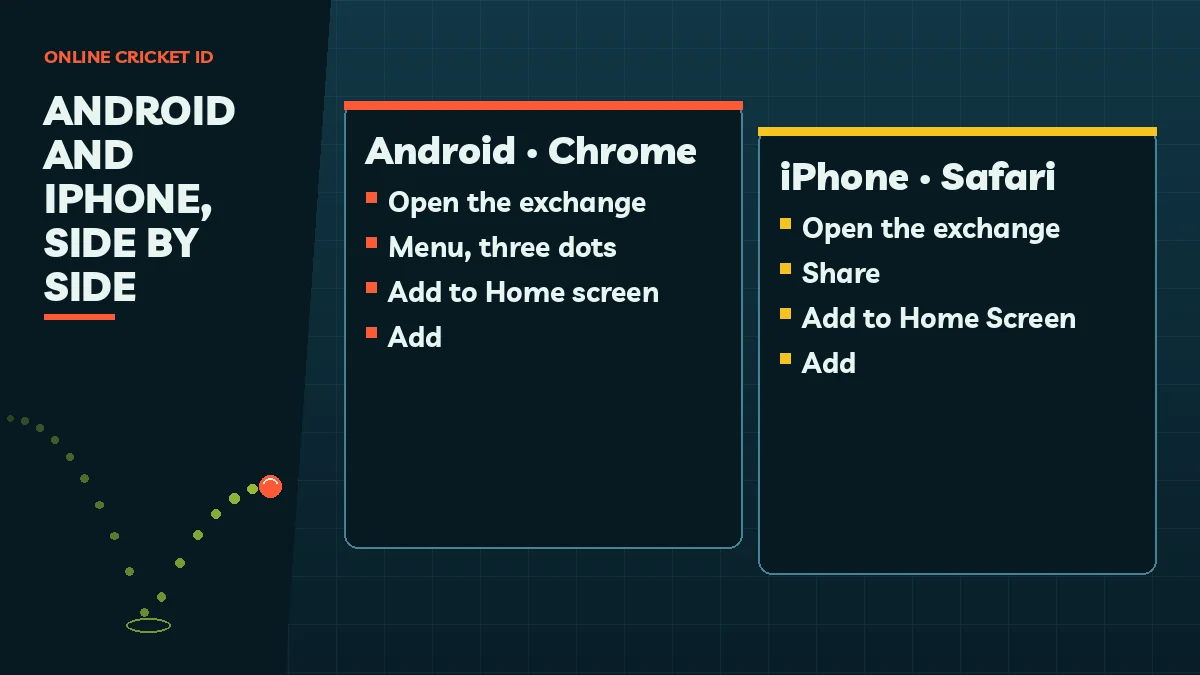
Open the thread link in Chrome The Online Cricket ID desk sends the exchange address inside your WhatsApp chat. Long-press it and pick Chrome if WhatsApp tries to show it in its own viewer, then wait for the sign-in form of Lotus365, Diamond Exchange or whichever exchange your ID is for.
Three dots, then Add to Home screen Chrome hides the option behind the dots beside its address bar. A few Android versions call it Install app; both labels end with the exchange on your home screen.
Shorten the name, then confirm Chrome fills in the page title, which on some exchanges is long and vague. Cut it down to the exchange name (useful once you hold two Online Cricket ID logins) and press Add, plus Add again if your launcher asks where to put it.
The icon now behaves like any other app on the phone. Tap it and the exchange opens full screen, usually without the Chrome address bar, which is why plenty of users forgt it is a web page at all.
Pin the sign-in page, not the search result that led you there.
Samsung Internet and a few other Android browsers have a similar option, often hidden under a menu called Add page to. It works, more or less, but Chrome keeps your saved password and the full-screen mode more reliably, so the Online Cricket ID desk suggests Chrome unless your phone simply does not have it.
iPhone Cricket Betting App Download Through Safari, Simple Setup
On an iPhone the job belongs to Safari, and only Safari does it cleanly.
Chrome for iOS has gained a home-screen option on recent versions, but the Online Cricket ID desk still sees fewer problems when iPhone users stick with Safari, partly because Safari is where the iPhone keeps saved passwords and partly because the share sheet layout has not changed in years.
Load the sign-in page in Safari Paste the link from your Online Cricket ID chat and wait until the username box appears on screen.
Share sheet to Add to Home Screen Safari puts its share control along the bottom edge on iPhone (top right on iPad). The line you want sits below the row of contacts and apps, so pull the sheet higher; missing entirely? Edit Actions brings it back.
Keep a clear name and save Something like Sky Exchange ID beats the default title. Press Add, and the shortcut joins the end of your app pages.
Small catch for Online Cricket ID users on iOS. iPhones sometimes keep a separate set of cookies for each home-screen icon, so the first time you open the new icon you may have to sign in again even though you were signed in inside Safari a minute earlier. That is normal behaviour, not a fault with your Online Cricket ID login.
Browser
Safari (recommended), Chrome on newer iOS
Menu path
Share, then Add to Home Screen, then Add
Sign-in
Same Online Cricket ID username and password as on Android or laptop
Four taps in Chrome put the icon on the phone.
Cricket Betting App Download on a Laptop: Safe Bookmark Setup
A laptop needs no download at all. Open the exchange address from the Online Cricket ID desk in Chrome, Edge or Firefox, and press Ctrl+D (Cmd+D on a Mac) to bookmark the sign-in page. Put the bookmark on the bar so it sits one click away.
Chrome and Edge also offer an install option for some sites, a a small icon at the right end of the address bar, which turns the exchange into a window of its own with a desktop shortcut; if it shows up, use it, and if it does not, a plain bookmark is every bit as good because both open the same live page.
Why a Laptop Suits Your Online Cricket ID Account
The wider screen shows the full ladder of back and lay prices, the bookmaker market and the session list side by side. Handy on a Test match day.
Same Online Cricket ID, Free on Every Device
Your one ID signs in on the laptop, the Android icon and the iPhone icon. The balance is the same wherever you open it.
Shared computer? Do not let the browser save your Online Cricket ID password, and sign out when you are done.
Official APK for the Cricket Betting App Download, Sent by the Online Cricket ID Desk
A handful of exchanges on the Online Cricket ID rack do publish their own Android APK file.
Where that is true, the Online Cricket ID desk sends the current file straight into your WhatsApp thread, the same thread that issued your ID, and that is the only place it should ever come from. Ask for it by name: tell the desk which exchange you play on and that you would like the APK if one exists. If the exchange has no APK, the desk will say so and point you back to the home-screen route, which in practice covers everything the file would.
Ask inside your own thread Write to +91 81097 11726 naming the exchange, Gold365 or 11xPlay for instance, and ask whether an APK exists for it right now.
Save it and grant one permission The file arrives as a WhatsApp document. When you open it, Android stops and wants WhatsApp to be trusted with unknown apps; grant that for this one file and flip the toggle back off once the install finishes.
No new account needed The APK takes the same Online Cricket ID username and password the desk already gave you, so your balance is waiting the moment you sign in.
A file forwarded from a group, a Telegram channel or a stranger is a different matter, and Online Cricket ID cannot vouch for it. Nobody can tell from the outside what has been bundled into a repackaged APK, and the desk has seen copies that look identical to the real thing on the first screen and then ask for an OTP or a UPI PIN on the second, which the real exchange never does.
A genuine exchange APK never pauses to request an OTP or UPI PIN, and the Online Cricket ID desk does not want card numbers either.
A deposit is made only to the account details that appear in the thread where your ID was issued.
A message from a different number halfway through the chat is a warning sign. Stop and check.
iPhones cannot install an APK at all; on iOS the Safari icon is the only route.
Updates and New Addresses for Your Cricket Betting App Download, Working Fixes
The home-screen icon updates itself. Its address does not.
Because the icon is just a pinned web page, every change the exchange makes to its markets, menus or casino lobby shows up the next time you open it, with no update to download. The weak point is the address. Betting domains get blocked in India from time to time, and when the address you pinned is blocked, the icon still sits on your screen looking perfectly fine while opening an error page.
Your account is not touched by any of this, and the Online Cricket ID desk repeats that point to almost everyone who writes in worried: the ID, the password and the balance all carry over to the new address exactly as they were. Only the doorway moved.
Untouched by a block: your Online Cricket ID username, its password, the money in it and any bet still open.
Changes: the web address, and so the icon that points to it.
Who has the new address: the Online Cricket ID desk, usually before most users notice the old one has gone.
The fix takes a minute. Message the Online Cricket ID desk for the working address, open it in Chrome or Safari, sign in once to confirm the balance, and pin it again following the steps above. Then press and hold the old icon and remove it, otherwse you end up with two icons that look the same and only one that works. An APK user follows the same idea: ask the Online Cricket ID desk for the current file rather than hunting for one.
Storage and Data After a Cricket Betting App Download, Light and Fast
Storage is the easy part. A home-screen shortcut takes no space worth counting, because it is a pointer to the live site rather than a program, so even a phone that keeps nagging about full memory can hold one, and you can pin all the exchanges you have Online Cricket ID logins for without noticing any difference.
Data use stays modest on the cricket side. Prices and session lines are small packets of numbers rather than video, and the desk has users following whole T20 chases on 4G without trouble. Live casino tables with video streams are heavier, so expect those to use noticeably more than the cricket markets.
Home-screen icon
No storage worth counting; updates with the live site
Odds and session screens
Light; fine on 4G mobile data for any Online Cricket ID exchange
Live casino video
Heavier; Wi-Fi is kinder if your plan is small
APK (where offered)
Takes space like any app; ask the Online Cricket ID desk for the current file
Patchy signal at a ground or on a train while your Online Cricket ID account is open? The page may pause and catch up, and markets suspend for a moment on a wicket or boundary anyway, so a brief freeze is not always your connection.
First Sign-In After Your Cricket Betting App Download: Fast Login Steps
Icon on the screen, now the ID.
No login yet? A shortcut with nothing to type into is a bit pointless, so sort that next: one WhatsApp message to the Online Cricket ID desk naming your exchange gets the process going, and the cricket betting app page for all 15 exchanges helps if you have not picked one. Then come back to the icon.
Start from the home screen Open the exchange from the new shortcut rather than from Chrome history, so you know the shortcut itself works well before match time.
Type the username exactly Copy the Online Cricket ID username from the chat if you like. No spaces before or after it; a stray space is a classic reason a correct ID gets refused.
Password, letter for letter Ab12 and ab12 count as two different passwords here, and the desk message shows yours exactly as it was set, so match it character by character.
Make the password yours The one in the chat is a starter. Inside the exchange, the account settings let you set a new one; do it on this first visit, before you place a bet, and the Online Cricket ID desk can still reset it later if you lose track.
Let the browser save it On your own phone only. Next time the shortcut signs in with one tap.
Errors on that first attempt are almost always about typing, and the cricket id login help for wrong-password and blocked-address errors lists each one with its fix. If you have forgotten the password altogether, the Online Cricket ID desk resets it in minutes and the username stays the same.
Order that saves waiting: pin the shortcut first, then send the ₹100. While the Online Cricket ID login travels to your chat, about 2 minutes after the deposit clears, the icon is already sitting there ready for it.
People also search for Online Cricket ID
cricket betting app download
cricket betting app download for android
cricket betting app download iphone
cricket betting app apk download
online cricket id app download
cricket betting app download free
cricket id app install
cricket exchange app download
add cricket betting app to home screen
cricket betting app download link
cricket betting app download latest version
cricket betting app for laptop
Cricket Betting App Download Options with a Free Online Cricket ID
Cricket betting app download for Android, kept in the WhatsApp chat on this page
Pin from Chrome, then leave the WhatsApp chat where you can reach it. That chat holds three things the shortcut cannot: your username, the password reset if you forget it, and the replacement address whenever a block hits. Treat the Online Cricket ID thread as the real install and the shortcut as a bookmark that happens to live on your home screen.
Cricket betting app download for iPhone, pinned from Safari as shown above
An iPhone takes the same exchange and the same Online Cricket ID login through Safari. These are the taps that matter:
Load the exchange sign-in page in Safari.
Tap Share, then Add to Home Screen.
Tap Add and open the new icon to sign in.
Cricket betting app apk download, only through the WhatsApp thread on this page
Some exchanges publish an Android APK. The Online Cricket ID desk sends the current file on request, and a file from any other link stays uninstalled.
Where to ask
WhatsApp +91 81097 11726, open 24x7
What it costs
The ID is free; first deposit from ₹100
iPhone
No APK; use the Safari icon
Cricket Betting App Download Problems: Real Fixes from the Online Cricket ID Desk
Three problems account for nearly every message the Online Cricket ID desk gets about icons.
A typical one, put together from a few chats: a user pins the exchange on a Sunday, it works all week, and on the following Saturday, an hour before an IPL evening match at 7:30 pm IST, the icon opens a blank error. He reinstalls Chrome, restarts the phone, clears the cache. None of it helps, because the address had been blocked, and the Online Cricket ID desk had the new one ready in the thread the whole time.
What you see
Likely cause
Fix
Icon opens an error or a blank page
The pinned address has been blocked
Ask the desk for the working address, pin it, delete the old icon
Icon opens in the wrong browser, with an address bar
It was pinned from a different browser, or the default browser changed
Delete it, open the address in Chrome or Safari, pin again
Two icons with the same name
An old address and a new one, both pinned
Open each; keep the one that loads the sign-in form
Signed in yesterday, asked again today
iPhone icon storage or cleared cookies
Sign in again; the account is unchanged
Correct password refused
Caps or a space in the username
Retype slowly, or request an Online Cricket ID reset
Wrong-browser icons deserve one extra line from the Online Cricket ID side. If you install a new browser and Android asks whether to make it the default, saying yes can change where links open, so the old icon may still work while the next one you pin lands somewhere odd. Easy fix, once you know.
Two pages pick up where icon trouble ends. If your shortcut is fine but the exchange itself feels slow or cramped on your handset, the best cricket betting app page, sorted by what each exchange does well may point you to a lighter one, and a fresh Online Cricket ID for it costs nothing. Money questions after a win belong to the cricket betting app real money page on deposits and payouts. Anything else, send the Online Cricket ID desk a screenshot of what the shortcut shows; it is open 24x7, and a picture usually settles it in one reply.
A shortcut on the phone changes nothing about what the law allows in your state. Rules have tightened and differ from place to place, so read yours first; Online Cricket ID logins go to adults of 18+ only.
The same shortcut on both phones.
Cricket Betting App Download Questions, Answered by the Trusted Online Cricket ID Desk
Can I find the Online Cricket ID app on the Play Store?
No. Real-money betting apps are not listed on Google Play in India, so there is no store version to find. You open your exchange in Chrome, add it to the home screen from the menu, and sign in with the ID the desk sends you on WhatsApp. It works the same way.
Is the cricket betting app download free with Online Cricket ID?
Yes, there is no charge at any point of setup. A shortcut costs nothing to create, and the desk adds no joining or monthly fee for the ID. The only money involved is your own balance: a first deposit starts at ₹100 by UPI, bank transfer or wallet, with ₹0 fee on deposits and withdrawals.
Is it safe to install a cricket betting APK sent by a friend?
It is not a good idea. A forwarded APK can be repackaged, and copies have asked for an OTP or UPI PIN, which no real exchange does. If your exchange has an APK, request the current file from the Online Cricket ID WhatsApp thread and install only that one.
After pinning the shortcut, will my Online Cricket ID still open on a laptop?
Yes. The username the desk issued is tied to one exchange, not to one device, so a Chrome shortcut on your Android, a Safari icon on an iPad and a bookmark on the office laptop all open the same account. Switching exchange, though, means asking for another ID.
How do I update the cricket betting app after setup?
You do not have to. The home-screen icon opens the live exchange site, so every change appears the next time you tap it. If the icon stops loading, the address has most likely been blocked; ask the desk for the working one and pin it again in place of the old icon.
Can I use the Online Cricket ID app on an iPhone?
Yes, as a Safari shortcut. Apple does not allow APK files, so iOS users pin the exchange page to the home screen from the share sheet instead. After that it launches full screen like any app, and the login is the one the desk sent, unchanged from what an Android user types.